Find My Phone Security5.66
Publisher Description
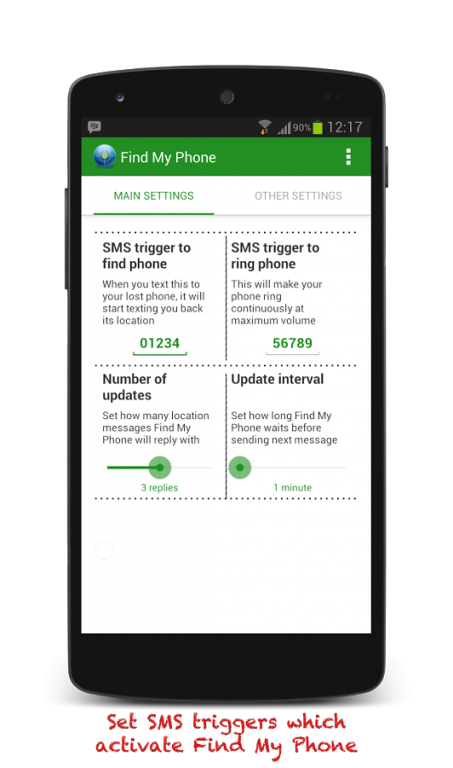
Find your lost, stolen, or misplaced phone with Find My Phone - the original phone locator / mobile finder app for Android!
Install this important security app BEFORE you lose your phone, as it can help you recover your lost Android device by using GPS, cell tower, and wifi phone tracking technology. Once activated, Find My Phone will provide a Google Maps link to your lost phone via email and SMS for FREE.
★ Easy to Use ★
Once activated, Find My Phone will reply to you with your mobile’s location information in real time:
► Lost device's current street address
► Google Maps link
► Remaining battery percentage
★ Quick Instructions ★
► Install Find My Phone. Enable GPS in Settings.
► If you lose your phone, text '01234' to your lost phone and start tracking it.
► Text '56789' to your phone to make it ring at maximum volume until you find it.
✔ Don't have another phone to text from?
Use a free online SMS service like Google Voice or textem.net to send the text, and your phone will email it's location to you.
✔ Already lost your phone?
Remote install is supported on older devices only, v3.0 or below.
Find My Phone is the BEST cell phone locator app!
✔ No registration required
✔ No battery drain
✔ No Ads
Even after 5 YEARS of being a top security and device recovery app on Android, we continue to strive being better based on your valuable feedback.
► Check out our premium version, the original Find My Phone app, for even better protection for your Android! For one low price, you get premium features like:
✔ Sim card monitoring
✔ Custom ringtones
✔ Remotely wipe phone
✔ Remotely lock phone
It is the best alternative to android device manager, seekdroid and other similar droid finder apps.
About Find My Phone Security
The company that develops Find My Phone Security is Mangobird. The latest version released by its developer is 5.66. This app was rated by 1 users of our site and has an average rating of 5.0.
To install Find My Phone Security on your Android device, just click the green Continue To App button above to start the installation process. The app is listed on our website since 2016-09-18 and was downloaded 79 times. We have already checked if the download link is safe, however for your own protection we recommend that you scan the downloaded app with your antivirus. Your antivirus may detect the Find My Phone Security as malware as malware if the download link to com.mango.findmyphone3 is broken.
How to install Find My Phone Security on your Android device:
- Click on the Continue To App button on our website. This will redirect you to Google Play.
- Once the Find My Phone Security is shown in the Google Play listing of your Android device, you can start its download and installation. Tap on the Install button located below the search bar and to the right of the app icon.
- A pop-up window with the permissions required by Find My Phone Security will be shown. Click on Accept to continue the process.
- Find My Phone Security will be downloaded onto your device, displaying a progress. Once the download completes, the installation will start and you'll get a notification after the installation is finished.
Program Details
System requirements
Download information
Pricing
Version History
version 5.66
posted on 2016-09-18
Bug fix
